> For AI agents: the complete documentation index is available at /llms.txt, the full documentation bundle is available at /llms-full.txt.
# Code splitting
Rspack supports code splitting, letting you divide your code into separate chunks. You have full control over the size and number of generated assets to improve loading performance.
Here, a Chunk refers to a resource that a browser needs to load.
## Dynamic import
Rspack uses the [import()](https://developer.mozilla.org/en-US/docs/Web/JavaScript/Reference/Operators/import) syntax that conforms to the ECMAScript proposal for dynamic imports.
In `index.js`, we dynamically import two modules through `import()`, separating them into a new chunk.
```js title=index.js
import('./foo.js');
import('./bar.js');
```
```js title=foo.js
import './shared.js';
console.log('foo.js');
```
```js title=bar.js
import './shared.js';
console.log('bar.js');
```
Building this project produces three chunks: `src_bar_js.js`, `src_foo_js.js`, and `main.js`. Inspecting them shows that `shared.js` exists in both `src_bar_js.js` and `src_foo_js.js`. We will cover how to remove duplicated modules later.
:::tip
1. Refer to [Module methods - Dynamic import()](/api/runtime-api/module-methods.md#dynamic-import) for the detailed dynamic import API, as well as how to use dynamic expressions and magic comments in dynamic import.
2. Although `shared.js` exists in two chunks, it is executed only once, so you don't have to worry about multiple instances.
3. Use the [output.asyncChunks option](/config/output.md#outputasyncchunks) to control whether dynamically imported modules generate independent async chunks.
:::
### Modules already available from parents
When an async chunk needs a module that is guaranteed to be loaded on every path to that chunk, Rspack can omit the duplicate module. This happens during code splitting, even with `optimization.splitChunks: false`.
For example, if a parent chunk contains `shared.js` and dynamically imports a child that also imports `shared.js`, the child can reuse the parent's module. Imports with the same `webpackChunkName` may add modules to that parent later during graph traversal; Rspack updates availability for its descendants as well. If another path reaches the child without loading `shared.js`, the child must retain its copy. Independent entries and workers have separate loading boundaries.
## Entry point
This is the simplest and most intuitive way to split the code, but it requires manual configuration. Let's start by looking at how to create multiple Chunks from multiple entry points.
```js title="rspack.config.mjs"
export default {
mode: 'development',
entry: {
index: './src/index.js',
another: './src/another-module.js',
},
stats: 'normal',
};
```
```js title=index.js
import './shared';
console.log('index.js');
```
```js title=another-module.js
import './shared';
console.log('another-module');
```
This will yield the following build result:
```
...
Asset Size Chunks Chunk Names
another.js 1.07 KiB another [emitted] another
index.js 1.06 KiB index [emitted] index
Entrypoint another = another.js
Entrypoint index = index.js
[./src/index.js] 41 bytes {another} {index}
[./src/shared.js] 24 bytes {another} {index}
```
Similarly, examining the output shows that they all include the repeated `shared.js`.
## Configuring chunk splitting
The splitting approach above is intuitive, but most modern browsers support concurrent network requests. If we split a single-page application into one chunk per page, the browser still has to fetch a large chunk when users switch pages, which wastes that concurrency. Instead, we can break the chunk into smaller ones and request those smaller chunks at the same time to use the browser's network capacity more effectively.
Rspack defaults to splitting files in the `node_modules` directory and duplicate modules, extracting these modules from their original Chunk into a separate new Chunk. Why does `shared.js` still appear repeatedly in our example above? The `shared.js` file here is very small, and splitting such a small module into its own Chunk can actually slow down loading.
We can configure the minimum split size through [splitChunks.minSize](/plugins/split-chunks-plugin.md#splitchunksminsize) to 0 to allow `shared.js` to be extracted on its own.
```diff title="rspack.config.mjs"
export default {
entry: {
index: './src/index.js',
},
+ optimization: {
+ splitChunks: {
+ minSize: 0,
+ }
+ }
};
```
After rebuilding, you will find that `shared.js` has been extracted separately, and there is an additional Chunk in the output that contains only `shared.js`.
If `shared.js` still appears duplicated after lowering [`splitChunks.minSize`](/plugins/split-chunks-plugin.md#splitchunksminsize), check [`splitChunks.minSizeReduction`](/plugins/split-chunks-plugin.md#splitchunksminsizereduction), [`splitChunks.minChunks`](/plugins/split-chunks-plugin.md#splitchunksminchunks), and request limits such as [`splitChunks.maxAsyncRequests`](/plugins/split-chunks-plugin.md#splitchunksmaxasyncrequests) / [`splitChunks.maxInitialRequests`](/plugins/split-chunks-plugin.md#splitchunksmaxinitialrequests) before reaching for [`splitChunks.cacheGroups.{cacheGroup}.enforce`](/plugins/split-chunks-plugin.md#splitchunkscachegroupscachegroupenforce).
If you want sufficiently large candidates to keep splitting after hitting those request limits, prefer [`splitChunks.enforceSizeThreshold`](/plugins/split-chunks-plugin.md#splitchunksenforcesizethreshold) before forcing an entire cache group with `enforce`.
For most production applications, a good baseline is:
```js title="rspack.config.mjs"
export default {
optimization: {
splitChunks: {
chunks: 'all',
},
},
};
```
while keeping the default cache groups. This usually deduplicates both initial and async chunks while still allowing the runtime to fetch only the chunks reachable from the current page.
### Force the splitting of certain modules
We can use [`optimization.splitChunks.cacheGroups.{cacheGroup}.name`](/plugins/split-chunks-plugin.md#splitchunkscachegroupscachegroupname) to force specific modules to be grouped into the same chunk, for example, with the following configuration:
```js title="rspack.config.mjs"
export default {
optimization: {
splitChunks: {
cacheGroups: {
someLib: {
test: /\/some-lib\//,
name: 'lib',
},
},
},
},
};
```
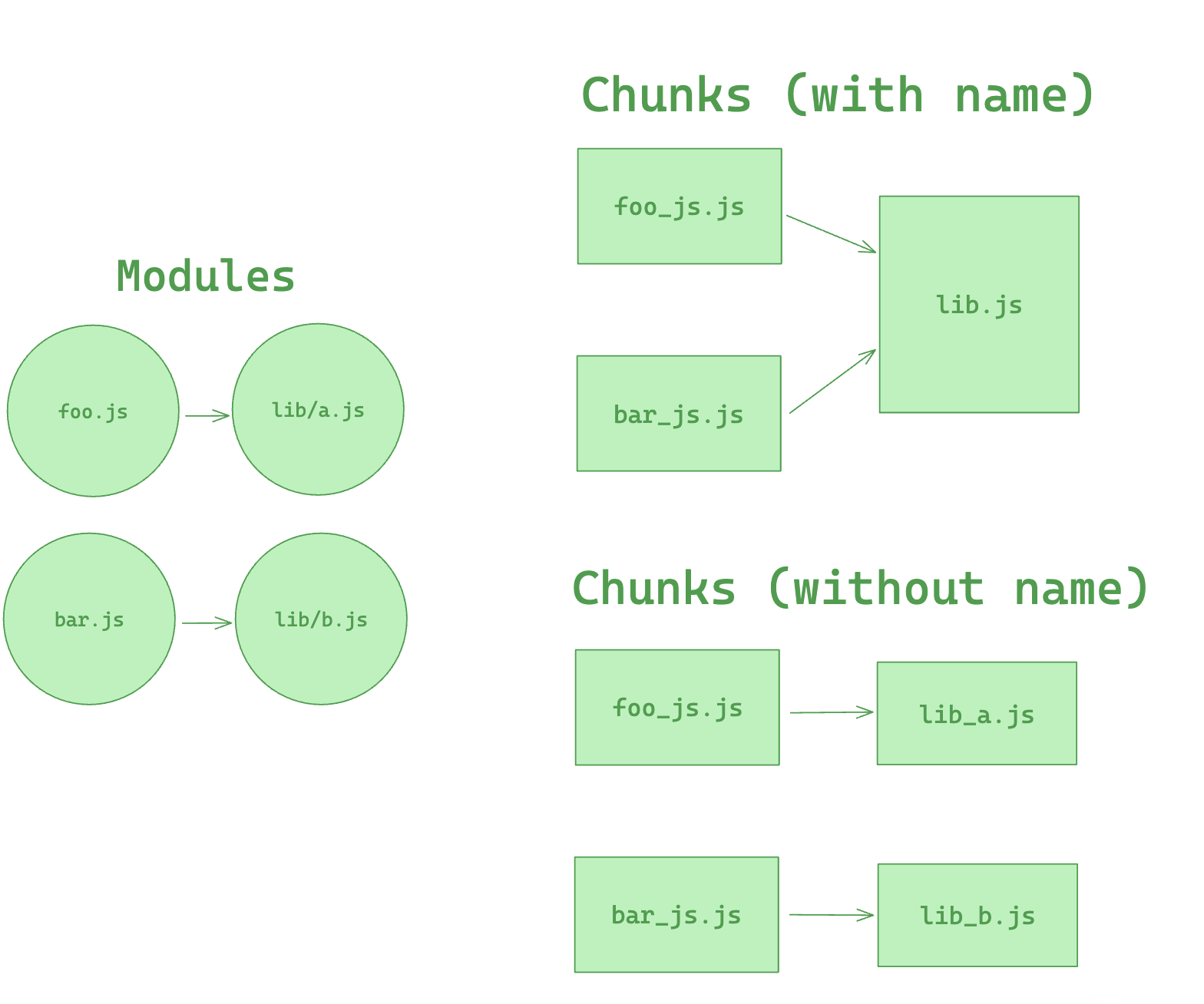
With the above configuration, all files that include the `some-lib` directory in their path can be extracted into a single Chunk named `lib`. If the modules in `some-lib` are rarely changed, this Chunk will consistently hit the user's browser cache, thus a well-considered configuration like this can increase the cache hit rate.
However, separating `some-lib` into an independent Chunk can also have downsides. Suppose a Chunk only depends on a very small file within `some-lib`, but since all files of `some-lib` are split into a single Chunk, this Chunk has to rely on the entire `some-lib` Chunk, resulting in a larger load volume. Therefore, when using `cacheGroups.{cacheGroup}.name`, careful consideration is needed.
More importantly, `name` is not just a filename choice. A fixed `name` can force different split candidates to be merged into the same shared chunk, which may cause a route to fetch modules from unrelated dependency chains. For most projects, avoid adding `name` unless you intentionally want one shared asset and accept the tradeoff.
This tradeoff is about chunk grouping and network fetch boundaries. It does not change JavaScript execution order, and it is unrelated to tree shaking. CSS is a separate caveat: in extracted CSS flows, splitChunks can affect final CSS order. See the [SplitChunksPlugin documentation](/plugins/split-chunks-plugin.md#faq) for details.
Here is an example showing the effect of the `name` configuration of cacheGroup.
## Prefetching/Preloading modules
Adding these inline directives to your imports allows Rspack to output resource hints that tell the browser that:
- **prefetch**: resource is probably needed for some navigation in the future
- **preload**: resource will also be needed during the current navigation
An example of this is having a `HomePage` component, which renders a `LoginButton` component which then on demand loads a `LoginModal` component after being clicked.
```js title=LoginButton.js
//...
import(/* webpackPrefetch: true */ './path/to/LoginModal.js');
```
This will result in `` being appended in the head of the page, which will instruct the browser to prefetch in idle time the `login-modal-chunk.js` file.
:::info
Rspack will add the prefetch hint once the parent chunk has been loaded.
:::
Preload directive has a bunch of differences compared to prefetch:
- A preloaded chunk starts loading in parallel to the parent chunk. A prefetched chunk starts after the parent chunk finishes loading.
- A preloaded chunk has medium priority and is instantly downloaded. A prefetched chunk is downloaded while the browser is idle.
- A preloaded chunk should be instantly requested by the parent chunk. A prefetched chunk can be used anytime in the future.
- Browser support is different.
An example of this can be having a `Component` which always depends on a big library that should be in a separate chunk.
Let's imagine a component `ChartComponent` which needs a huge `ChartingLibrary`. It displays a `LoadingIndicator` when rendered and instantly does an on demand import of `ChartingLibrary`:
```js title=ChartComponent.js
//...
import(/* webpackPreload: true */ 'ChartingLibrary');
```
When a page which uses the `ChartComponent` is requested, the charting-library-chunk is also requested via ``. Assuming the page-chunk is smaller and finishes faster, the page will be displayed with a `LoadingIndicator`, until the already requested `charting-library-chunk` finishes. This will give a little load time boost since it only needs one round-trip instead of two. Especially in high-latency environments.
:::info
Using webpackPreload incorrectly can actually hurt performance, so be careful when using it.
:::
Sometimes you need to have your own control over preload. For example, preload of any dynamic import can be done via async script. This can be useful in case of streaming server side rendering.
```js
const lazyComp = () =>
import('DynamicComponent').catch((error) => {
// Do something with the error.
// For example, we can retry the request in case of any net error
});
```
If the script loading will fail before Rspack starts loading of that script by itself (Rspack creates a script tag to load its code, if that script is not on a page), that catch handler won't start till chunkLoadTimeout is not passed. This behavior can be unexpected. But it's explainable — Rspack can not throw any error, cause Rspack doesn't know, that script failed. Rspack will add onerror handler to the script right after the error has happen.
To prevent such problem you can add your own onerror handler, which removes the script in case of any error:
```html
```
In that case, errored script will be removed. Rspack will create its own script and any error will be processed without any timeouts.
This page is adapted from [webpack documentation](https://webpack.js.org/guides/code-splitting/) under the [CC BY 4.0](https://creativecommons.org/licenses/by/4.0/), with modifications.